Home with Ask Oracle: Oracle Fusion’s AI-Powered Home Page

Home with Ask Oracle is one of the most visible user experience changes introduced with Oracle Fusion Cloud Applications Release 25D. It brings a new Redwood-based home page and global navigation experience that helps users find tasks, pages, work areas, and information more quickly. Instead of relying primarily on menus, users can now start from a search-first interface that combines natural language search, a structured Product Map, and personalized Suggestions based on recent and frequent activity.
What Is Changing?
Home with Ask Oracle introduces a more modern and intuitive way to navigate Oracle Fusion. The main changes are focused on how users find and access their work, not on changing the underlying business processes.
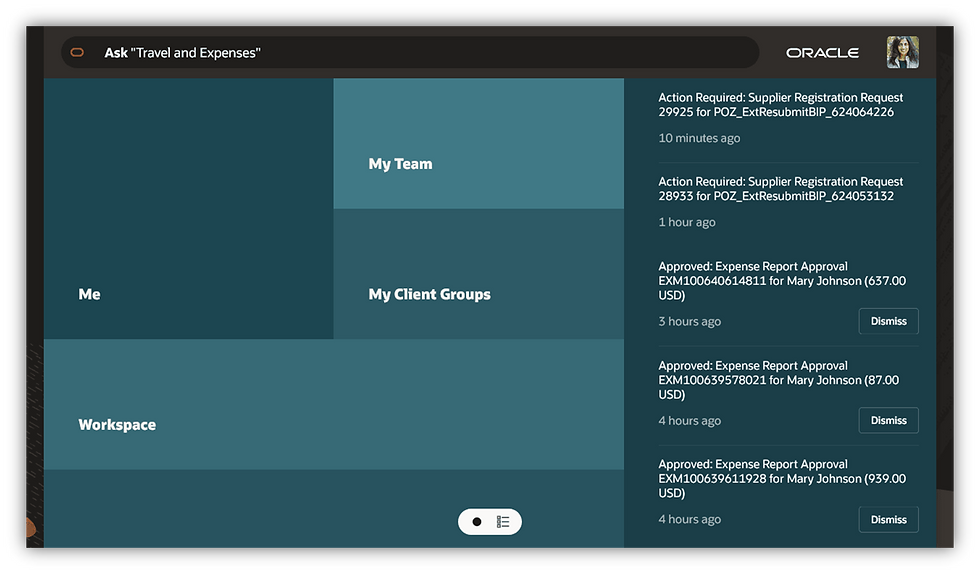
Ask Oracle Search – A natural language search bar integrated into the home page and header, enabling users to type questions or keywords to find tasks, pages, and work areas easily. This search is more intelligent and task-oriented than the previous global search, meaning users can use phrases like “Create Payables Invoice” or other plain language queries to quickly navigate to the right functions.
Product Map – A new hierarchical navigation panel (replacing the old Navigator menu) that organizes applications and modules in a structured format. Users can browse the product areas (e.g. Financials, HCM, Sales) and their functions through this map as an alternative to search.
Personalized Suggestions – The home page highlights frequently or recently used tasks as “Suggestions,” giving users quick access to what they commonly use. This replaces manually-managed Favorites in the new model.
Redesigned Layout – The entire home page uses the Oracle Redwood user interface design, providing a modern, tile-based layout. Users will see sections (tiles) for areas like their personal workspace or responsibilities. For example, role-based sections in HCM might include “My Team” or “My Client Groups” tiles for managers or HR specialists. (The exact tiles vary based on a user’s roles; Redwood pages continue to show content relevant to each user’s roles, just as before.)
What Is Not Changing?
While navigation gets a facelift, all underlying functionality remains the same. Key points that are unchanged include:
Business logic & Processes – No changes to application functionality or business processes. The new UI doesn’t alter how transactions or modules work in the backend.
Roles & Security – No changes to user roles, privileges, or security. Users will still only see and access what their security roles permit.
Underlying Pages – Both ADF-based pages and Redwood pages continue to function as before. The new Home page is strictly a change in navigation and user experience; it doesn’t modify the content or availability of functional pages.
Implementation Considerations for Enabling New Home
Enabling Home with Ask Oracle is a site-level (global) setting. This means once you turn it on for an environment, all users will see the new Home and navigation; individual users cannot opt out and revert to the old News Feed home on their own. It’s important to plan and communicate this change:
Change Management – The shift to a search-driven homepage represents a noticeable change in user experience. Prepare your organization by educating users on how to use the Ask Oracle search and Product Map effectively for their day-to-day tasks.
No Impact on Permissions – The new navigation changes how users find things, not what they can do. All access and data security remains governed by existing roles/privileges. Users will have access to the same functions as before, via new navigation paths.
Features Not Available on the New Home Page
The new Home streamlines navigation, but note that a few features from the old home are not carried over to Home with Ask Oracle:
Favorites – Not supported on the new home. Users cannot manually pin favorites; instead, the Suggestions feature will show commonly used items.
Watchlist – Not supported. The Watchlist infolets (flag icon) from News Feed have no direct replacement in the new design.
Oracle Guided Learning (OGL) on Home – If you use Oracle’s Guided Learning overlays on the home page, these may not display properly on Home with Ask Oracle. Oracle has noted that OGL launchers might require adjustments or updates in future releases to be compatible with the new home layout.
Dynamic EL Menus – If you employ EL expressions to conditionally show/hide menu items on the old Navigator, be aware that these might not carry over in the same way. The new home relies on security roles and index-based search rather than runtime UI expressions.
It’s best to review these areas before enabling the new home page, so you can plan any necessary workarounds or user guidance (e.g. instructing users on how to access formerly “favorited” items via search or Product Map).
Validation and Testing Tips before Rollout
Before rolling out Home with Ask Oracle, it’s recommended to do thorough user acceptance testing focusing on core navigation scenarios
Cross-Functional Checks – Have representative end-users from various functional areas (e.g. Finance, Projects, HR, Procurement) go through their typical daily tasks using the new home page. Ensure they can locate and open their key work areas using the Ask Oracle search and/or Product Map.
Search Behavior – Test partial matches and natural language phrases in Ask Oracle. For example, confirm that searching a common term or an incomplete task name still brings up the relevant page
Product Map Navigation – Browse the Product Map to ensure it provides access to all important modules and tasks that were previously reachable via the old Navigator menu.
Notifications & Approvals – If your users rely on the notification icon for approvals, validate the new Home page notifications behavior. Note that only the primary action (e.g., Approve) for each notification is directly available on the card; secondary actions (like Reject or Reassign) require opening the full notification details. Also confirm that reading notifications on the home page marks them as read, and that the standard notification synchronization process is running (to update the home page notifications regularly).
Comparing News Feed Home vs. Home with Ask Oracle
To put the changes in context, here’s a quick comparison of how key navigation elements differ between the old “News Feed” home page and the new “Home with Ask Oracle”:
Navigation Element | News Feed Home (Old) | Home with Ask Oracle (New) |
Main Navigation Menu | A hierarchical “hamburger” menu listing all modules and work areas | Product Map & Ask Oracle – No full-tree menu; users navigate by browsing the Product Map or typing in the Ask Oracle search |
Global Search | Basic keyword search for tasks/pages in top bar | Ask Oracle – Enhanced natural language search that understands task intent |
Home Button | Returns to the News Feed home landing page | Home (Oracle logo or Home icon) – Returns to the new Home with Ask Oracle start page |
Favorites (★ icon) | Provides quick access to user-pinned favorite links | Suggestions – Shows frequently used or recently used tasks for quick access (no manual favorites) |
Watchlist (flag icon) | Displays Watchlist infolets (saved items or indicators) on the home page | (No equivalent) – Watchlist is not supported on Home with Ask Oracle |
Notifications (bell icon) | Full notification list with ability to take primary and secondary actions directly from home | Notifications panel – All notifications shown, but only primary action is available on each card (secondary actions require opening the notification) |
User Menu (username) | Menu for user preferences, help, sign out | User menu – Unchanged; still provides preferences, help, sign out, etc. |
Note: The new Home experience currently focuses on Redwood UI. Classic ADF pages and their content remain accessible as usual; the changes are in how users reach those pages.
Final Thoughts
Home with Ask Oracle is more than just a facelift—it’s a shift from menu-driven navigation to a search-first, intent-based navigation model in Oracle Fusion Cloud Applications. Organizations planning to enable this feature should ensure users are prepared for the new experience, and invest time in validating critical navigation paths given the changes in how users find their work. It’s also important to review the unsupported features (like Favorites and Watchlist) so you can provide guidance or alternatives for users who relied on them.
With proper preparation and communication, Home with Ask Oracle can simplify navigation, reduce reliance on memorized menu paths, and help users get to their tasks more efficiently. Embracing this evolution can ultimately drive a more intuitive and productive user experience across the Oracle Fusion Cloud ecosystem.


Comments